突然发现谷歌搜索的英语字典还不错,用一分钟vibe了一个谷歌搜索强行变查词工具的插件。
原理就是给你要查的单词前面加上
define:
手动加很麻烦 所以vibe了一个开关 开启的时候搜索的任何东西前面自动加上define:这样就能稳定调出谷歌搜索的字典
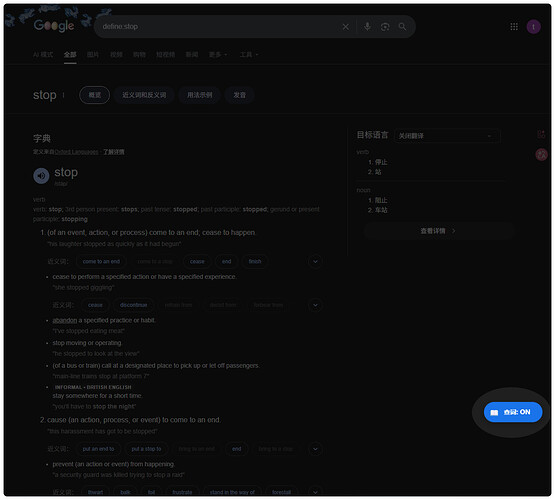
查词:ON 时,搜索任何东西时都会在你的搜索内容前加上
define:,对于我来说比较实用,所以分享给大家,我最近在区分英语重音,谷歌会调用牛津词典的api,里面同一个单词动词和名词的不同重音会有两条语音,区分重音是英语学习一个比较重要的内容。

查词:OFF 时,搜索任何东西时插件不会在前面加上
define:,所以馊出来就是默认的谷歌搜索。
下面的代码直接搞到篡改猴里即可使用啦~
// ==UserScript==
// @name         Google 自动查词模式 V4 (沉浸式悬浮球版)
// @namespace    http://tampermonkey.net/
// @version      4.0
// @description  仿沉浸式翻译悬浮球,使用 Shadow DOM 彻底解决被网页遮挡或隐藏的问题
// @author       Coee
// @match        *://*.google.com/search*
// @match        *://*.google.com.hk/search*
// @match        *://*.google.co.jp/search*
// @match        *://*.google.co.uk/search*
// @match        *://*.google.com.tw/search*
// @grant        none
// ==/UserScript==

(function() {
    'use strict';

    let isDefineMode = localStorage.getItem('google_define_mode') !== 'false';

    // 拦截重定向逻辑
    function checkAndRedirect() {
        const urlParams = new URLSearchParams(window.location.search);
        let q = urlParams.get('q');
        if (!q) return false;

        if (isDefineMode && !q.toLowerCase().startsWith('define:')) {
            urlParams.set('q', 'define:' + q);
            window.location.replace(window.location.pathname + '?' + urlParams.toString());
            return true;
        }
        return false;
    }

    if (checkAndRedirect()) return;

    // 创建沉浸式悬浮球
    function createFloatingBall() {
        // 如果宿主元素已存在,则跳过
        if (document.getElementById('gemini-define-host')) return;

        // 1. 创建宿主容器 (直接挂载到 html 根节点,避开 body 被刷新的问题)
        const host = document.createElement('div');
        host.id = 'gemini-define-host';
        host.style.position = 'fixed';
        host.style.right = '20px';
        host.style.bottom = '15%'; // 放在靠下的位置,类似沉浸式翻译
        host.style.zIndex = '2147483647'; // 宇宙最高层级

        // 2. 开启影子结界 (Shadow DOM)
        const shadow = host.attachShadow({mode: 'open'});

        // 3. 注入结界内的 HTML 和 CSS
        const wrapper = document.createElement('div');
        wrapper.innerHTML = `
            <style>
                .fab-container {
                    display: flex;
                    align-items: center;
                    background: ${isDefineMode ? '#1a73e8' : '#ffffff'};
                    color: ${isDefineMode ? '#ffffff' : '#5f6368'};
                    border-radius: 24px;
                    box-shadow: 0 2px 10px rgba(0,0,0,0.2);
                    cursor: pointer;
                    overflow: hidden;
                    transition: all 0.3s cubic-bezier(0.25, 0.8, 0.25, 1);
                    height: 44px;
                    width: 44px; /* 初始状态只是一个圆球 */
                    border: 1px solid rgba(0,0,0,0.1);
                    user-select: none;
                }
                .fab-container:hover {
                    width: 130px; /* 鼠标悬停时拉长 */
                    box-shadow: 0 4px 15px rgba(0,0,0,0.3);
                }
                .fab-icon {
                    min-width: 44px;
                    height: 44px;
                    display: flex;
                    justify-content: center;
                    align-items: center;
                    font-size: 18px;
                }
                .fab-text {
                    white-space: nowrap;
                    font-weight: bold;
                    font-family: system-ui, -apple-system, sans-serif;
                    font-size: 14px;
                    opacity: 0;
                    transform: translateX(10px);
                    transition: all 0.3s ease;
                }
                .fab-container:hover .fab-text {
                    opacity: 1;
                    transform: translateX(0);
                }
            </style>
            <div class="fab-container" id="fab">
                <div class="fab-icon">📖</div>
                <div class="fab-text" id="fab-text">查词: ${isDefineMode ? 'ON' : 'OFF'}</div>
            </div>
        `;

        shadow.appendChild(wrapper);

        // 挂载到根节点
        (document.body || document.documentElement).appendChild(host);

        // 4. 绑定点击事件
        const fab = shadow.getElementById('fab');
        const fabText = shadow.getElementById('fab-text');

        fab.addEventListener('click', () => {
            isDefineMode = !isDefineMode;
            localStorage.setItem('google_define_mode', isDefineMode);

            // 瞬间改变外观
            fab.style.background = isDefineMode ? '#1a73e8' : '#ffffff';
            fab.style.color = isDefineMode ? '#ffffff' : '#5f6368';
            fabText.innerText = `查词: ${isDefineMode ? 'ON' : 'OFF'}`;

            // 处理搜索词
            const urlParams = new URLSearchParams(window.location.search);
            let currentQ = urlParams.get('q') || '';

            if (isDefineMode && !currentQ.toLowerCase().startsWith('define:')) {
                urlParams.set('q', 'define:' + currentQ);
                window.location.href = window.location.pathname + '?' + urlParams.toString();
            } else if (!isDefineMode && currentQ.toLowerCase().startsWith('define:')) {
                urlParams.set('q', currentQ.replace(/^define:\s*/i, ''));
                window.location.href = window.location.pathname + '?' + urlParams.toString();
            }
        });
    }

    // 多重保险触发机制
    setInterval(() => {
        if (!document.getElementById('gemini-define-host')) {
            createFloatingBall();
        }
    }, 500);

})();
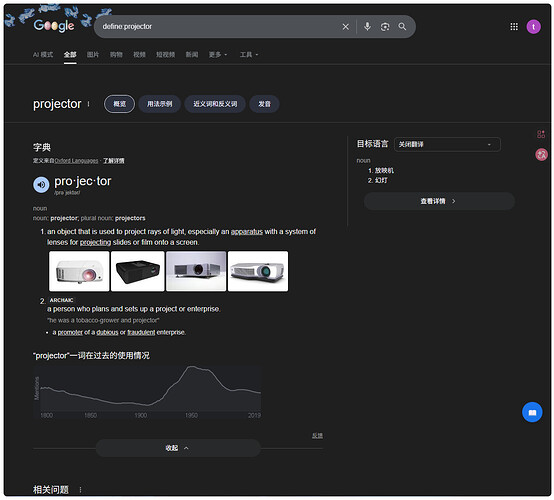
使用效果:
评论